How to follow a live log file (tail) on Windows
A program is writing to a log file and you want to watch it as it happens, the way people do with the tail command on other systems. Windows does not ship that command, and opening the file in a text editor shows only a frozen copy. There are two good ways to follow a log live.
What tail means
Tail means showing the end of a file, and following it as it grows. It is the classic way to watch an application log while you reproduce a problem: you do the action, and the new lines scroll past.
Windows has what you need built in, but it is a command, so it takes a little care.
The built-in way with PowerShell
Open PowerShell from the Start menu and run one command. Change the path to your own log file. The -Tail option shows the last lines first, and -Wait keeps the command running and prints new lines as they arrive.
- Open PowerShell from the Start menu.
- Type: Get-Content "C:\logs\app.log" -Tail 20 -Wait
- Press Enter. The last 20 lines appear, then new lines as they are written.
- Press Ctrl+C to stop following.
Tip. Use quotation marks around the path if it contains spaces. This command only reads the file, so it does not change it.
Where the command falls short
The command prints plain text and nothing more. There is no search box, no way to show only the errors and no colour for warnings. If you scroll up to read an older line, the new output keeps pushing it away.
Very large files can also be slow to open in a text editor, which is why people reach for tail in the first place.
Follow a log with a viewer
Tidy Button's Log Viewer opens a log file and can follow it live. Only the lines on screen are loaded, so large files open in moments and do not fill your memory.
It only reads the file. It never changes, moves or deletes your log.
- Open Log Viewer and press Open file, or drop the log onto the window.
- Switch on Follow. New lines appear as they are written.
- Leave Auto-scroll on to stay at the bottom.
- Scroll up to read an older line. Auto-scroll pauses.
- Press Paused: jump to end to go back to the newest line.
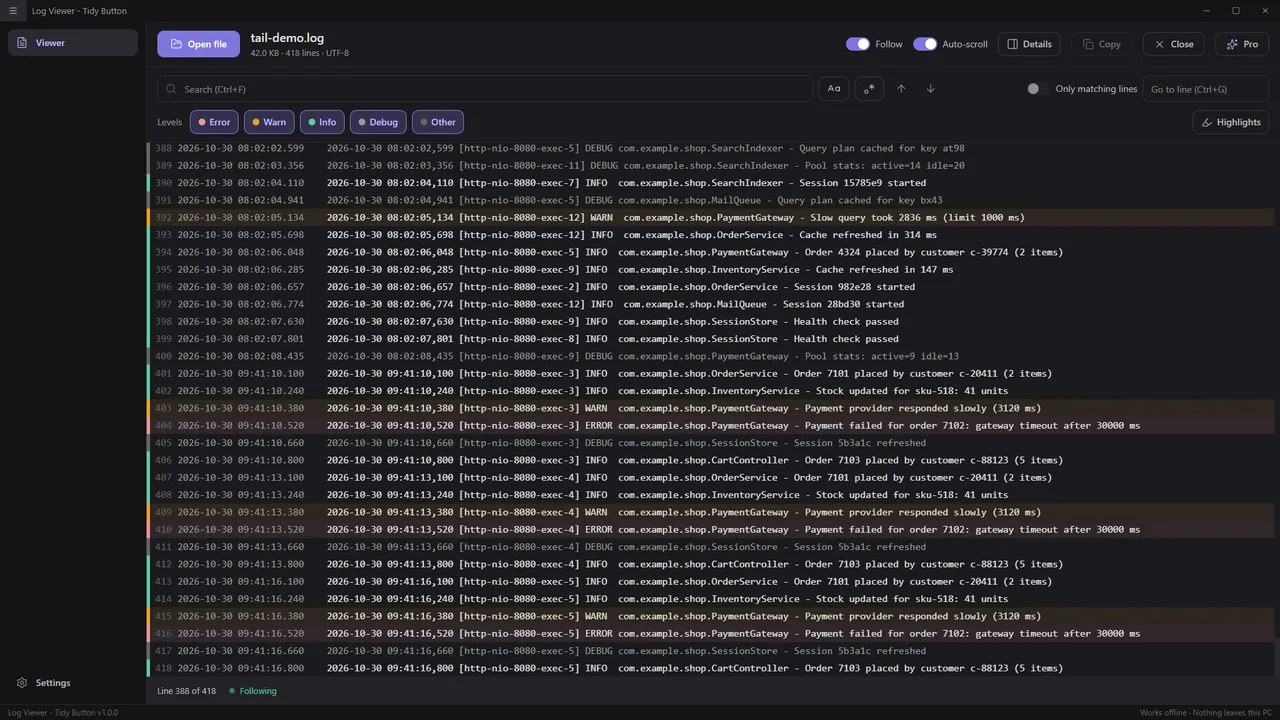
Follow a log live. The list stays on the end until you scroll up.
Tip. Auto-scroll can only be switched on while Follow is on.
Show only what matters
Once the log is open you can search it. Type a word in the search box and press Enter to jump to the next match, or Shift+Enter for the previous one. You can use plain text or a regular expression, and switch on Only matching lines to hide every other line.
Under the search box, the Levels row lets you show just Error and Warn. Each line has a coloured bar for its level, and stack traces stay together with the error that caused them.
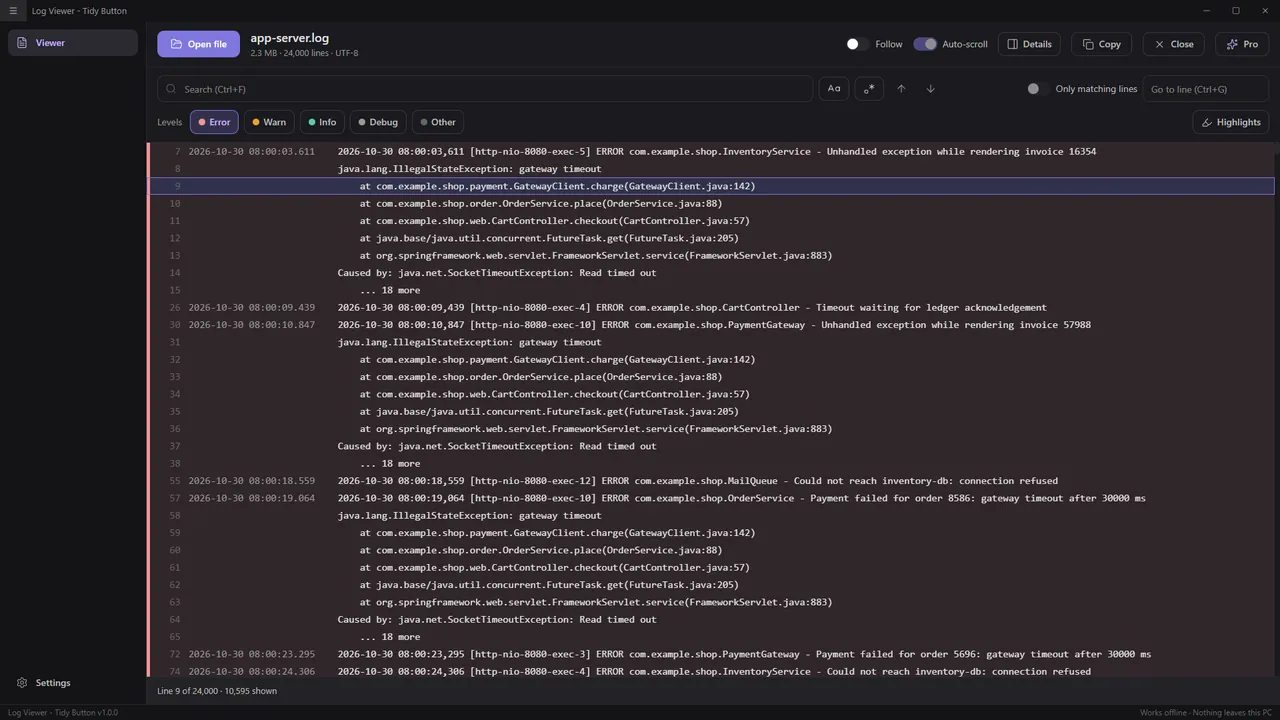
Filter by level to see only the errors.
Highlight words and handle rotated logs
Press Highlights to colour words such as error, timeout or failed. Add your own under Text to highlight. The rules are kept the next time you open the app.
If the log file is cut short or replaced while you follow it, the viewer starts again from the top and tells you so.
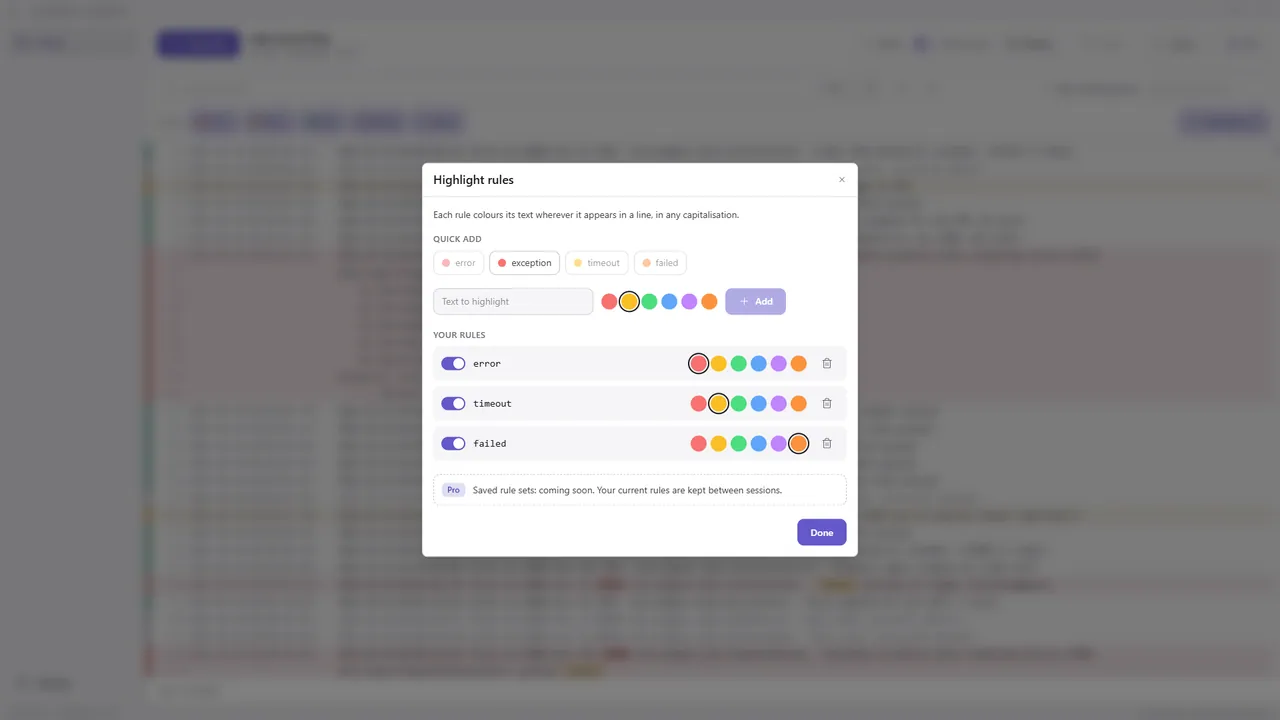
Give each important word its own colour.
What the free version limits
The free version opens one file at a time. A Pro add-on is planned for people who work with many logs: multiple tabs, merging logs by timestamp, saved highlight rule sets and bookmark export. Log Viewer reads files only. It cannot edit or save changes to a log.
Questions
Is there a tail command in Windows?
Not as a separate command. PowerShell does the same job with Get-Content and the -Tail and -Wait options.
How do I stop following the log in PowerShell?
Press Ctrl+C. The command stops and you get the prompt back.
Does Log Viewer change my log file?
No. It only reads the file you choose or drop onto the window. It never changes, moves or deletes it.
Why did new lines stop scrolling into view?
Auto-scroll pauses as soon as you scroll up to read. Press Paused: jump to end to resume.
If you want to follow a log with search, level filters and colours, try Tidy Button's Log Viewer. It is free on the Microsoft Store, works offline, needs no account and never uploads your logs.
More from Log Viewer
Questions or something missing? Support is by email, and a person reads it.