Permanently deleted files: can recovery tools find them?
You emptied the Recycle Bin, so the file is gone. Is it really? The honest answer is: not always. This page explains what deleting does, why recovery tools can sometimes bring files back, and what overwriting can and cannot do. It is general information, not a promise about any drive.
What happens when you delete a file in Windows
A normal delete moves the file to the Recycle Bin. The file is still whole there, and you can put it back. If you press Shift and Delete together, the file skips the Recycle Bin. Emptying the Recycle Bin removes the files from it too.
In all these cases, the usual result is that the drive stops listing the file. The stored data is generally not wiped on the spot. It stays where it was until that space is used for something else.
Why recovery tools can sometimes find the file
Recovery tools look at the drive itself rather than at the list of files. If the old data has not been written over, they may be able to read it. That is why a file you deleted a while ago can sometimes be found.
Whether a file can be found depends on the drive, on how much has been written since, and on other factors. No one can tell you in advance that a file is gone for good, or that it can be brought back.
What overwriting a file does
Overwriting means writing new data over the place where the file was stored, before it is deleted. File Shredder, a free app from the Microsoft Store, does this. It overwrites the file with random data and flushes it to the drive, empties it, renames it several times and deletes it. Folders are removed last, from the inside out.
The aim is that undelete tools cannot restore the file. Nothing goes to the Recycle Bin, and a shred cannot be undone, so the app asks you to check the list and type SHRED first.
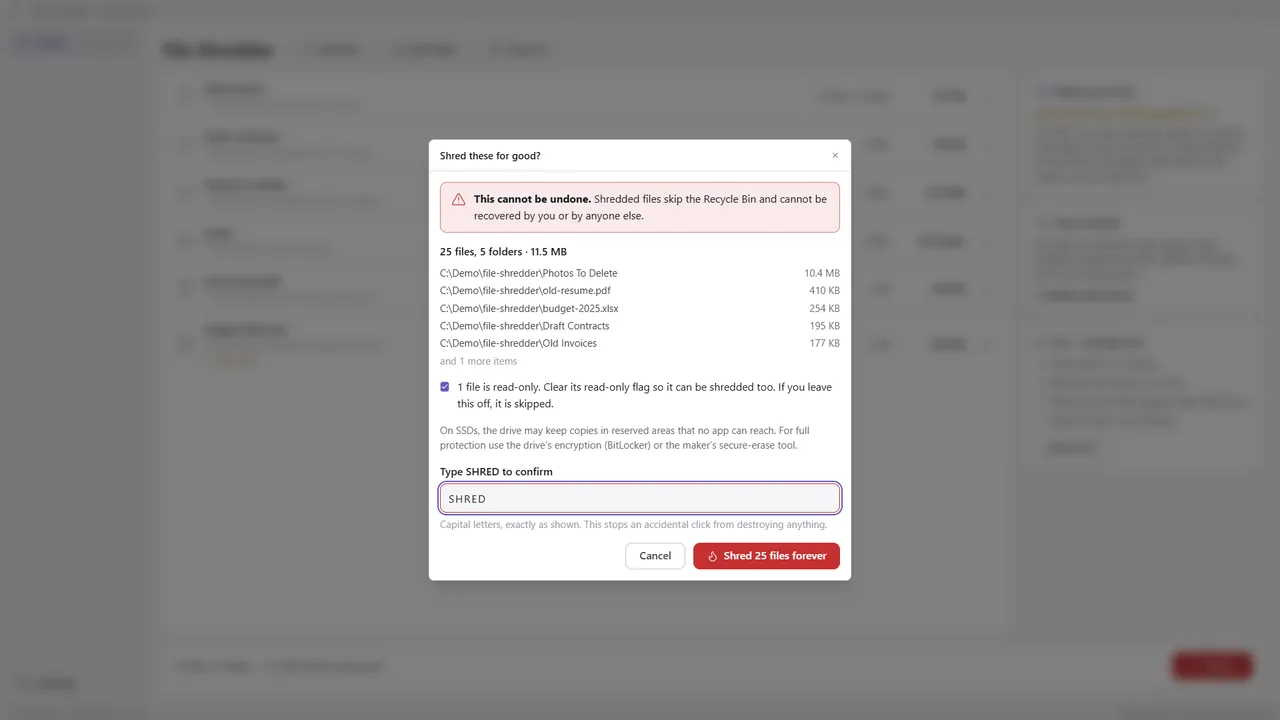
You see the file count and size, then type SHRED to confirm.
Where overwriting does not help
Overwriting only reaches the file you shred. It cannot reach copies kept elsewhere, such as backups, cloud-sync folders, earlier versions of a file or the Recycle Bin.
SSDs are a special case. An SSD may keep copies in reserved areas that no app can reach. File Shredder checks what kind of drive your files are on and tells you. For full protection on an SSD, use drive encryption or the drive maker's secure-erase tool.
So treat shredding as one careful step, not a promise. If something is truly sensitive, think about every place a copy may sit.

The app is honest about SSDs.
How to shred files in File Shredder
Only add files you are sure you want gone. A shred cannot be undone.
- Open File Shredder and press Add files or Add folder. You can also drop items onto the window.
- Check the list. Each item shows its path, how many files it holds and its size.
- Press Shred... at the bottom right.
- Read the confirmation window. It shows the number of files, the total size and the largest items.
- Type the word shown in capital letters, exactly as written, then press the red button.
- Read the report. Press Save report (TXT) if you want a copy.
Tip. Press Cancel in the confirmation window if you are not sure. Nothing is deleted until you confirm.
What the app refuses, and what the free version limits
To protect you, the app refuses Windows and program folders, whole drives, your user profile folder, its own data and links that lead out of the folder you chose. A file in use by another program is skipped and left exactly as it was. You can press Stop after the current file at any time.
The free version shreds any number of files with one random pass. A paid Pro add-on is planned, but it is not available yet. The app works offline, needs no account and sends no file names anywhere.

System folders are refused, with a plain reason.
Questions
Are files really gone when I empty the Recycle Bin?
Not necessarily. The usual result is that the drive stops listing the file, while the stored data stays until the space is reused. That is why recovery tools can sometimes find it.
Can I get a shredded file back?
Do not count on it. The file is overwritten with random data, emptied, renamed and deleted, and the aim is that undelete tools cannot restore it. A shred cannot be undone, so check the list first. On an SSD, or where another copy exists, traces can remain, as explained above.
Does shredding work on an SSD?
It overwrites the file, but an SSD may keep copies in reserved areas that no app can reach. For full protection use drive encryption or the maker's secure-erase tool.
Does it remove my backups?
No. It cannot reach copies kept elsewhere, such as backups, cloud-sync folders or earlier versions of a file.
If you have a few documents you want removed more thoroughly than a normal delete, try File Shredder. It is free on the Microsoft Store, works offline and needs no account. It shows you exactly what will be destroyed before it does anything.
More from File Shredder
Questions or something missing? Support is by email, and a person reads it.