Check printing software for a small business: free options
Writing checks by hand is slow, and mistakes mean voided checks. Small businesses, clubs and households often need only a few checks a month, so a paid accounting package feels like too much. Here are the free options and what to look for.
The free options, from simplest to most helpful
Many people start by writing checks by hand and noting each one in a notebook or a spreadsheet. It costs nothing and works, but the amount in words is easy to get wrong, and the notebook easily falls out of date.
The next step is a template in a word processor or spreadsheet program. You type the details and print on your check stock. It is free, but you line it up by trial and error, and nothing keeps a register for you.
A third option is a small app made for the job. Check Printer is one: it is free on the Microsoft Store, keeps a register of every check and prints on pre-printed check stock.
What check printing software should do
Look for a few basics before you pick any tool. It should write the amount in words for you, show a preview of where everything lands, let you correct the position on your printer, and keep a log of every check with its number.
It should also be clear about what it does not do. Check Printer prints onto checks your bank or a check supplier already printed. It does not print the number strip along the bottom of a check, or account numbers, on blank paper. It never asks for bank login details.
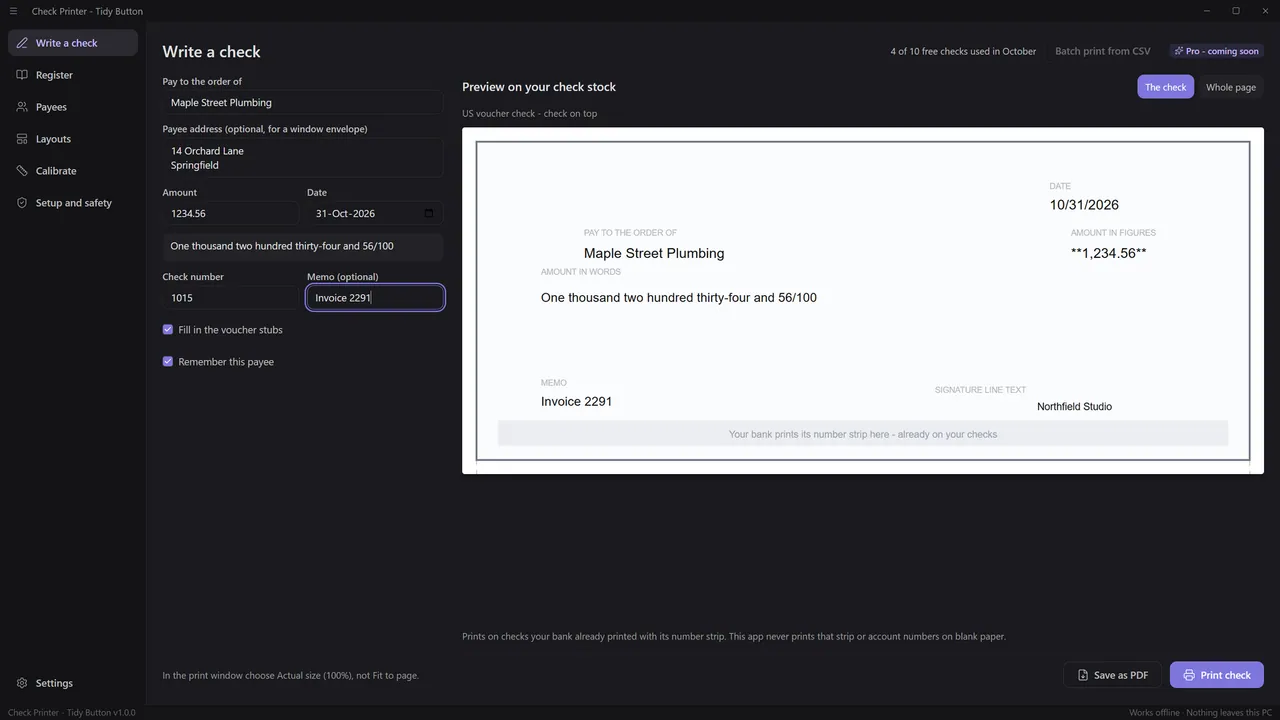
Type the payee and amount. The amount in words fills in by itself.
Tip. In the UK and some other places the word is cheque. This page uses the US spelling, check, and the app uses it too.
Print your first check
Here is the basic flow in Check Printer. The amount in words is filled in for you, in US style or in the Indian lakh and crore style.
- Open Check Printer. The Write a check screen opens first.
- Type the payee in Pay to the order of. Pick a saved name from the list if it appears.
- Type the number in Amount. The amount in words fills in on its own.
- Check the Date, the Check number and the Memo (optional) box.
- Look at the preview. Press Whole page to see the full sheet, or The check to see it larger.
- Press Print check. A PDF opens in your PDF viewer.
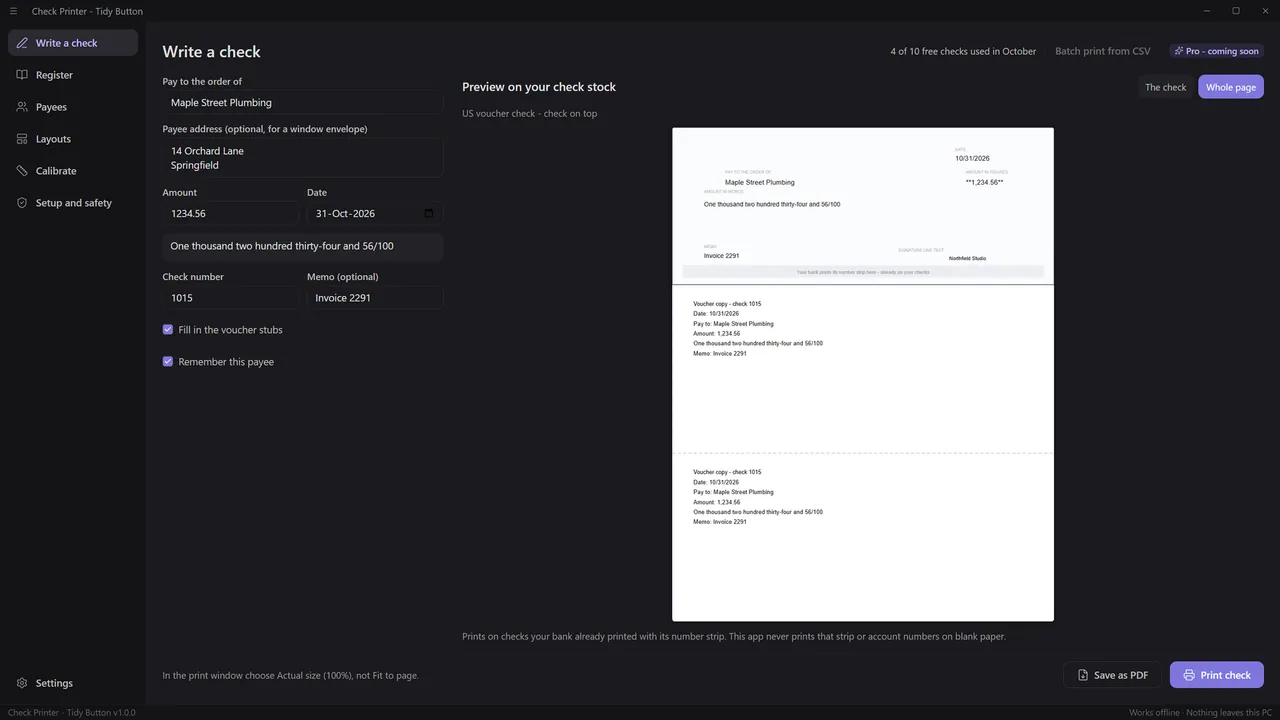
See the whole page before you print.
Tip. In the print window choose Actual size (100%), not Fit to page. Press Save as PDF instead if you only want the file.
Line the print up with your check stock
The first print is rarely perfect. A calibration page fixes that once, and the offsets are saved for each printer and layout.
- Open Calibrate your printer.
- Type your printer in Printer name, or leave it empty for the default printer. Choose the Layout you use.
- Press Open the calibration page and print it on plain paper at Actual size.
- Hold a real check over the printed page against a window or lamp, and measure how far the outline is from the edge of the check.
- Enter the distances in Across and Down, in millimetres. Right and down are positive. Left and up are negative.
- Press Save offsets.
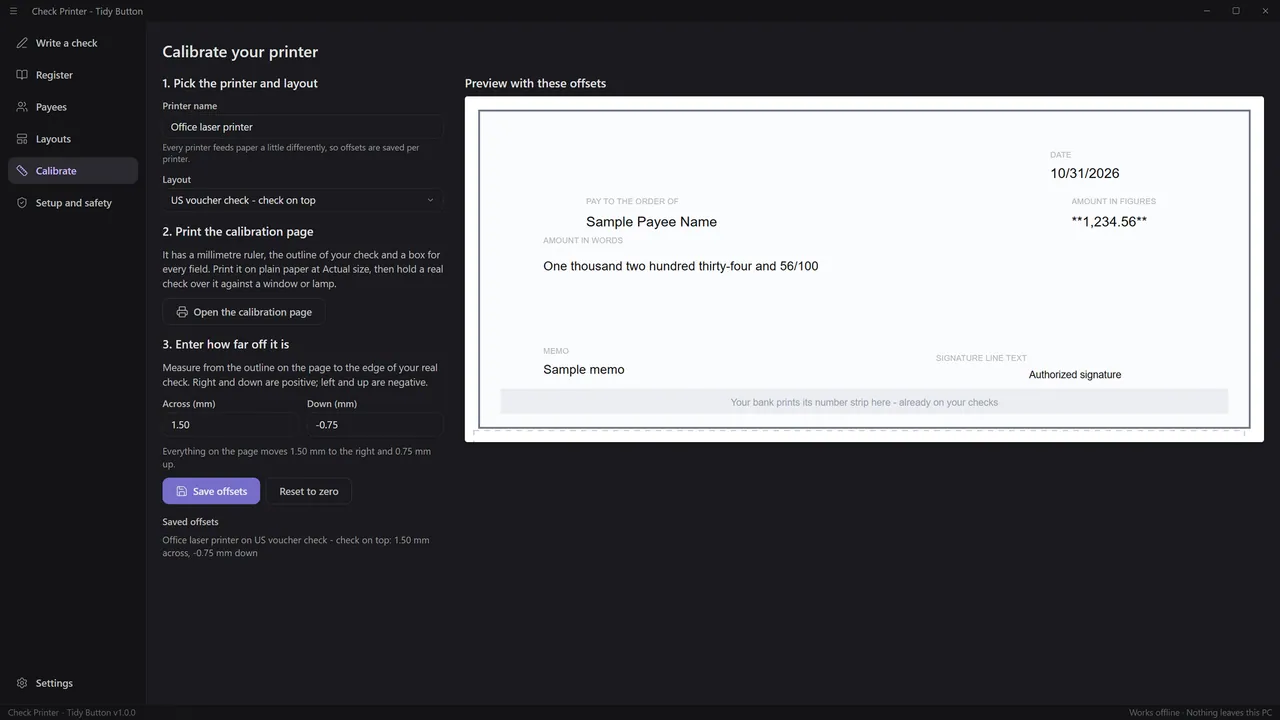
Measure once, enter the offsets, and they are saved.
Keep a register of every check
Every check you print is logged with its number, date, payee, amount and status. Check numbers count up on their own, and a number already in use is refused. In Register you can search, filter by Printed, Cleared or Void, and press Export to CSV for a spreadsheet program.
If you make a mistake, press Void on the row and give a reason. The row stays in the register, and Reprint gives the new check the next number. Voiding marks the row in your register only. It does not stop payment at your bank.
Tip. Press Back up now in Setup and safety to save your register, payees, layouts and offsets in one file.
What the free version limits
The free version prints 10 checks every calendar month and keeps 1 layout. For rent, a few suppliers or a club, that is often enough. If you write more, or need several layouts, a paid Pro add-on is planned, but it is not available yet.
The built-in layouts are US voucher checks with the check on top, in the middle or at the bottom, 3 checks per page. Canada, UK and India sizes are approximate, so measure your own stock and adjust. Your payees, amounts and register stay on your PC, and the app works offline.
Questions
Does it print on blank paper?
No. It prints onto checks your bank or a check supplier already printed. It does not print the number strip along the bottom, or account numbers, on blank paper. A voucher copy for your records can be printed on plain paper.
Does it ask for my bank details?
No. It never asks for bank login details, and it makes no network requests.
How many checks can I print for free?
The free version prints 10 checks every calendar month and keeps 1 layout.
Are the Canada, UK and India sizes exact?
They are approximate. Measure your own stock and adjust the layout.
If you write a few checks a month and want them filled in neatly, try Check Printer. It is free on the Microsoft Store, works offline and needs no account. Print the calibration page first, then your first check.
More from Check Printer
Questions or something missing? Support is by email, and a person reads it.