Coming to the Microsoft Store
Duplicate File Finder Find the extra copies.
Pick your folders and the app lists every group of identical files, compared by their full content. Choose which copy to keep, review the list, and the extras go to the Recycle Bin. Works offline, no account.
Not on sale yet. The app is still being built.
We will link the Store listing here the day it is live. Until then there is nothing to download.
- Works offline
- No account, no ads, no tracking
- Recycle Bin, never permanent delete
- Free
See it
Four views. One scan, tidy.
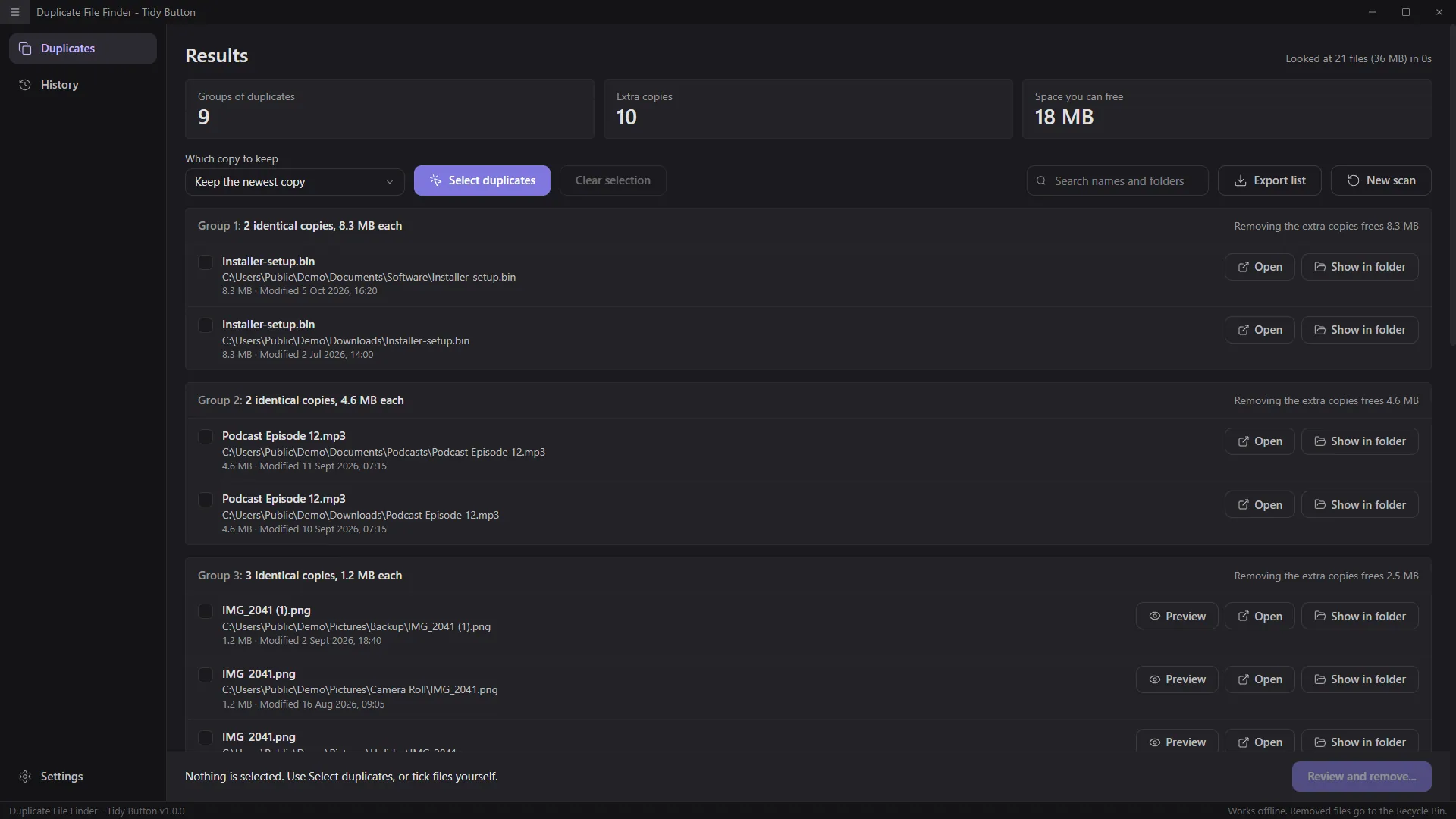
Results
Every group of identical files, with the space you can free
Keep one
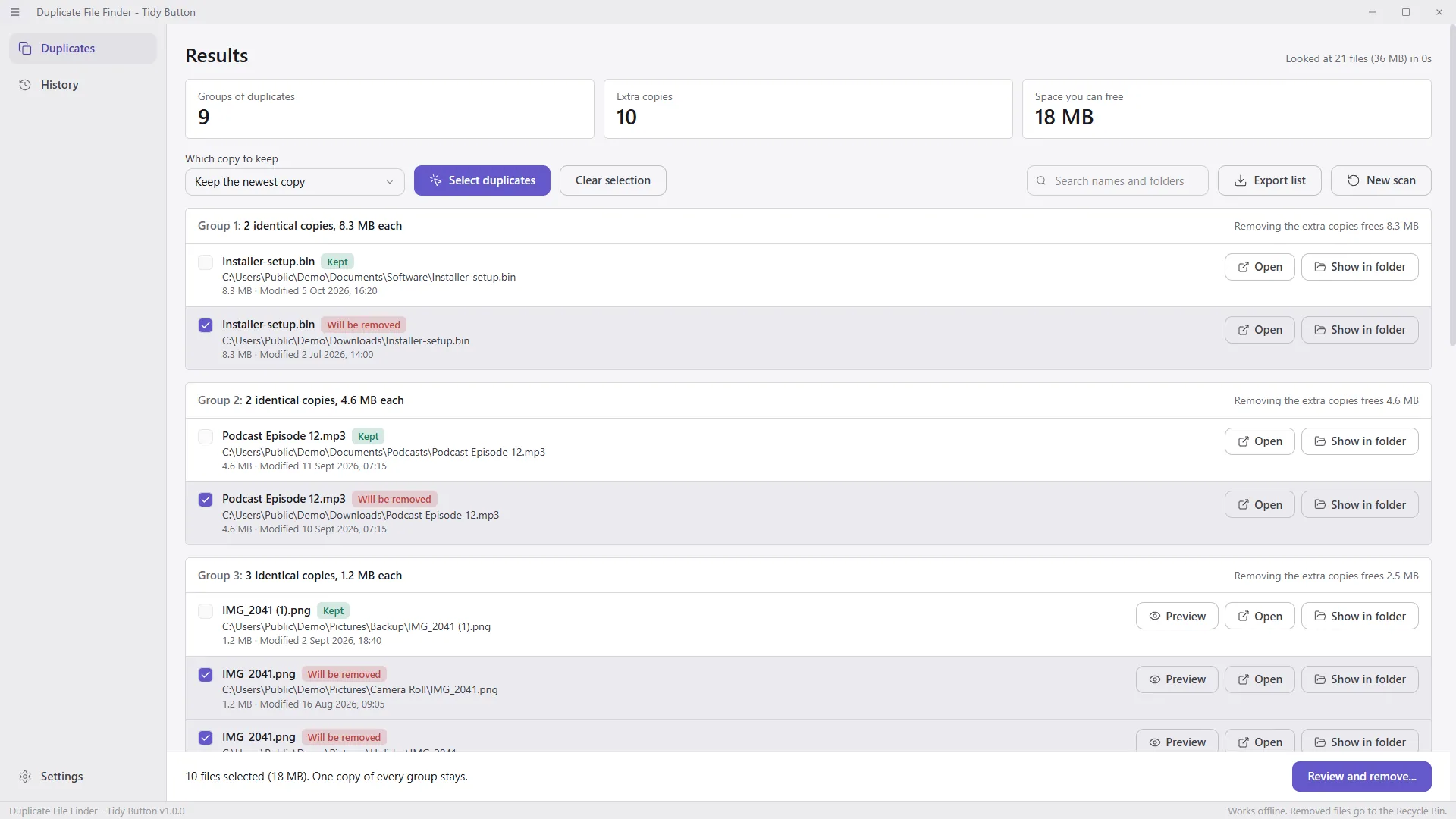
One button selects the extra copies and keeps one
Preview

Preview a picture before you decide
Review
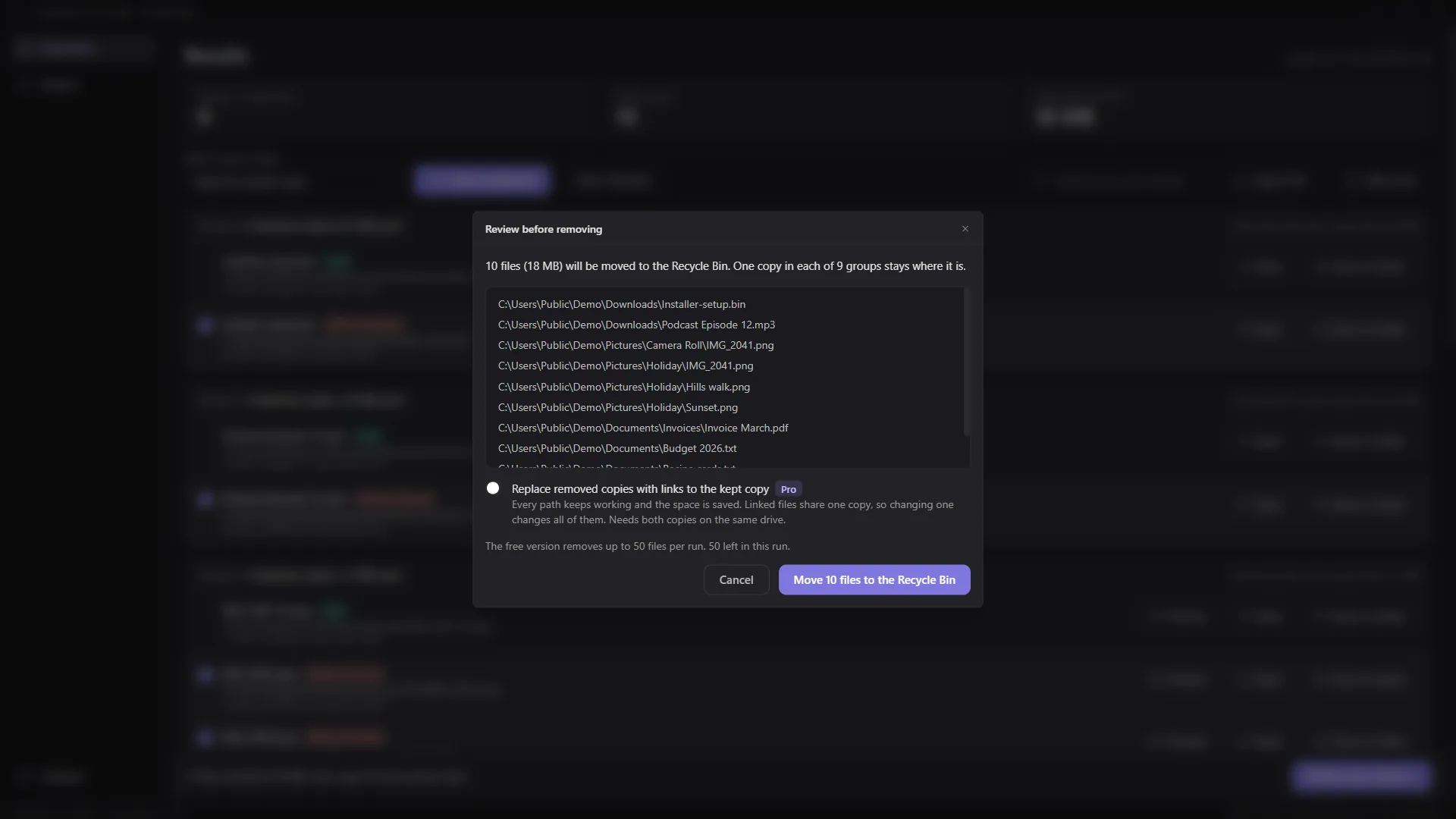
Review every file before it moves to the Recycle Bin
Screens show a made-up set of demo files and a drawn picture. The app has light, dark and other themes.
What it does
What it does.
Duplicate File Finder compares the files in the folders you choose and shows every group of exact copies, with each file's path, size and date and the space you could free. Pick the newest or the oldest copy to keep, or tick files by hand. A review window lists exactly what will move, and removed files go to the Recycle Bin, so you can restore them. One copy of every group always stays.
Compared by content
Files are matched by their full content, never by name or size alone. A renamed copy still counts, and two files that only share a name do not.
Clear groups
Each group shows the full path, size and date of every copy, with totals for groups, extra copies and the space you can free.
Preview before you decide
See a picture or the start of a text file in the app, or use Open and Show in folder.
Keep the newest or the oldest
One button selects the extra copies. You can also tick files yourself. One copy of every group is always kept.
Review, then remove
A review window lists every file that will go. Removed files move to the Recycle Bin, never to a permanent delete.
Filter and search
Ignore small files, look only at pictures, videos, music, documents or archives, and search the results by name or folder.
Export the list
Save the list as a CSV file to open in a spreadsheet.
Safe by default
Windows, program and repository folders are skipped, and online-only OneDrive files are not downloaded.
The small print, in plain English
Safe by design.
- Nothing is removed until you review the list and confirm.
- Removed files go to the Recycle Bin, where you can restore them.
- At least one copy of every group always stays.
- Your files are read on your PC to compare them and are never uploaded.
- The free app works offline. The only network use is the optional Pro licence check.
- No account. No ads. No tracking.
Good for
Handy when your disk is filling up.
- A downloads folder full of repeated files
- Photo folders with the same picture saved twice
- Copied documents and old backups
- Freeing space on a PC that is nearly full
Questions
Plain answers.
How does it decide that two files are the same?
By their full content, not by name or size alone. A renamed copy is found, and two different files that share a name are not mixed up.
Does it delete anything on its own?
No. You choose the folders, review the list and press the button. Removed files go to the Recycle Bin, and one copy of every group always stays.
Can I get a removed file back?
Yes, until you empty the Recycle Bin. Open the Recycle Bin and restore the file.
Does it need an internet connection?
No. Everything in the free app works offline. The only network use is the optional Pro licence check.
Does it upload my files?
No. Your files are read on your PC to compare them and are never sent anywhere.
What are the free limits?
The free version scans up to 3 folders at a time and moves up to 50 files per run to the Recycle Bin. Everything you have already found stays visible, and you can still preview, search and export it.
What does Pro add?
A one-time Pro add-on removes the limits and adds a similar picture finder for JPEG and PNG pictures, more rules for which copy to keep, a hard link option and scan history.
Which versions of Windows does it run on?
Windows 10 and Windows 11.